Split. Scatter.
Secure.
Windows 10+ · More platforms coming soon
Features
Engineered for resilience
Built for the day a cloud provider deletes your data, bans your account, or silently corrupts a file — and you still need it back.
Survives Cloud Outages
Reed-Solomon erasure coding splits your file into N shards across different providers — any K are enough to restore. A single cloud going down, banning your account, or losing your data can't take your files with it.
Provider-Blind Encryption
AES-256-CTR encryption applied client-side before anything leaves your machine. Even if every shard leaks — or every cloud is compromised — the bytes are unreadable without your key.
Hide What You're Hiding
Steganography embeds your encrypted data inside ordinary photos or videos. The carrier opens normally — your data is invisible. Useful when an encrypted blob would itself attract attention.
12 Cloud Providers Supported
Google Drive, OneDrive, Dropbox, S3 / R2 / B2 / Wasabi / MinIO, plus free anonymous hosts. Mix and match across consumer and object-storage providers — your manifest tracks what went where.
Parallel & Chunked Transfers
Multi-threaded uploads and HTTP-Range chunked downloads saturate your bandwidth. Auto-retry on transient failures, instant cancellation, per-shard progress.
Detect Tampering & Loss
Every shard carries a SHA-256 checksum. Verify all clouds in one click — silent corruption, mid-transfer flip, or a deleted file are caught before you actually need to restore.
Self-Healing Repair
Missing shards? Download the surviving K, mathematically reconstruct the missing pieces using the original key, and re-upload — restoring full N-of-K redundancy. No data ever touches an unencrypted state.
I used to have a complete digital copy of EVA: RE-TAKE — my favorite fan doujinshi. I stored it in the cloud. I was a paying premium subscriber.
One day I opened the folder to read it and it was gone. No warning. No appeal. The provider had deleted it for a "policy violation" and that was final — the files, and my subscription money, both gone for good.
I wasn't angry at the policy. I was angry that one company had the unilateral, permanent power to erase something I cared about — and there was absolutely nothing I could do about it.
That's why ShardHex exists. Not as a feature. As a lesson I learned the hard way.
Interface
See it
From splitting files into erasure-coded shards to encrypting data in place — explore every screen of the app.
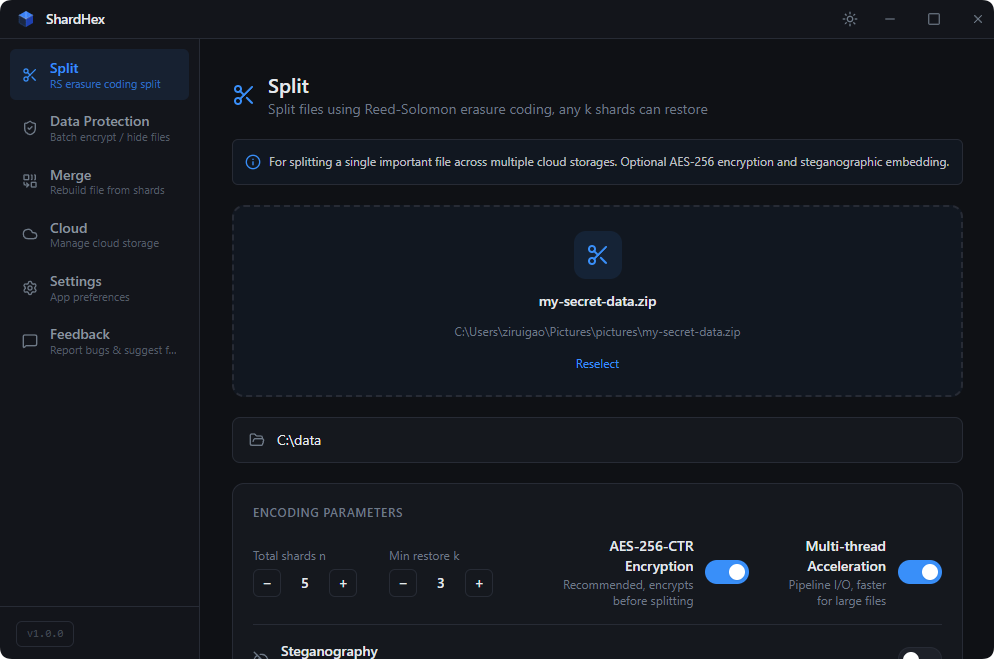
Configure N/K Reed-Solomon parameters with optional AES-256 encryption, then split your file into erasure-coded shards
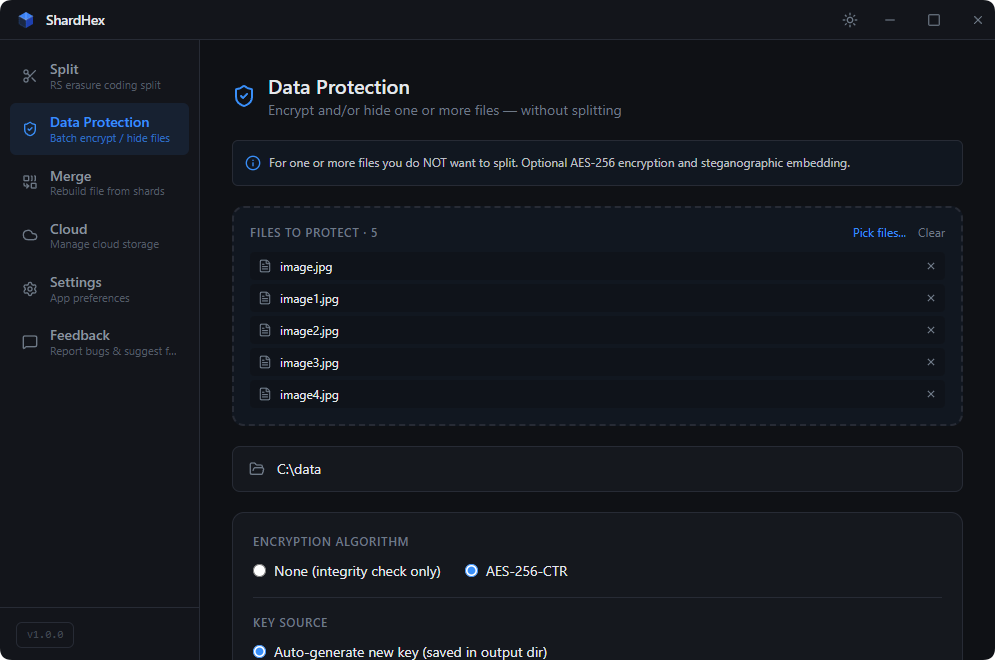
Batch encrypt files with AES-256-CTR, or embed them into carrier images via steganography — safeguard data without splitting
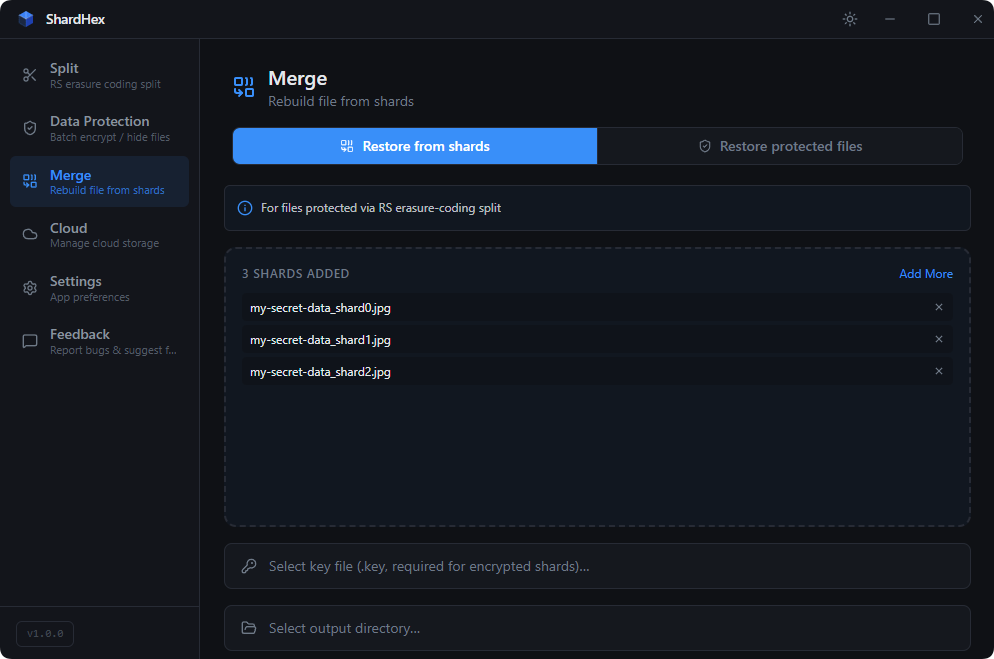
Drop any K shards from a split to mathematically reconstruct the original file — works even when some shards are missing
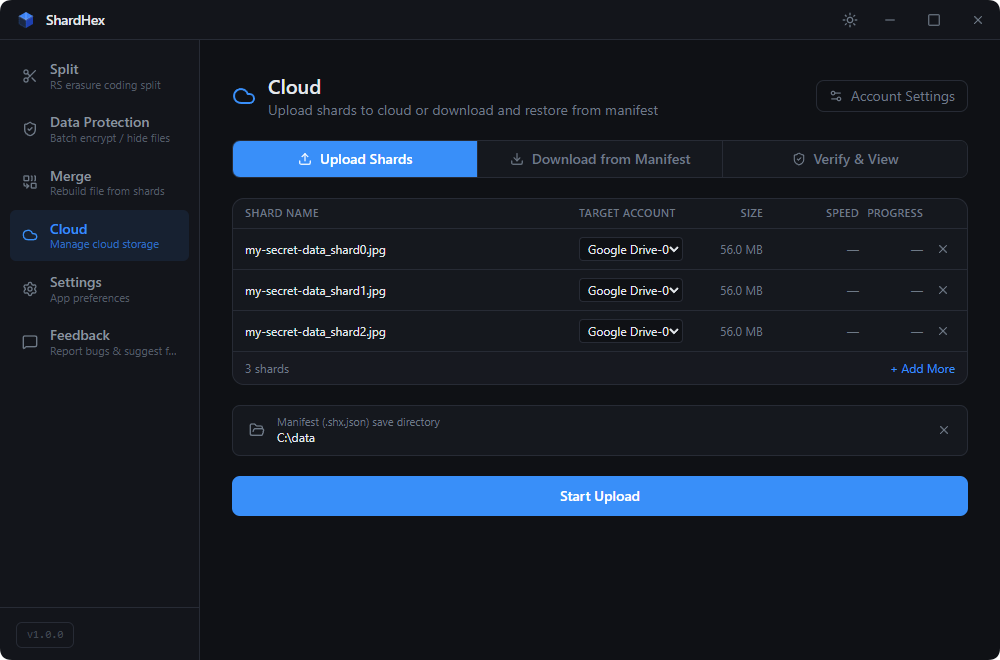
Scatter shards across up to 12 cloud providers in parallel — Google Drive, Dropbox, OneDrive, S3 / R2 / B2 / Wasabi / MinIO and more
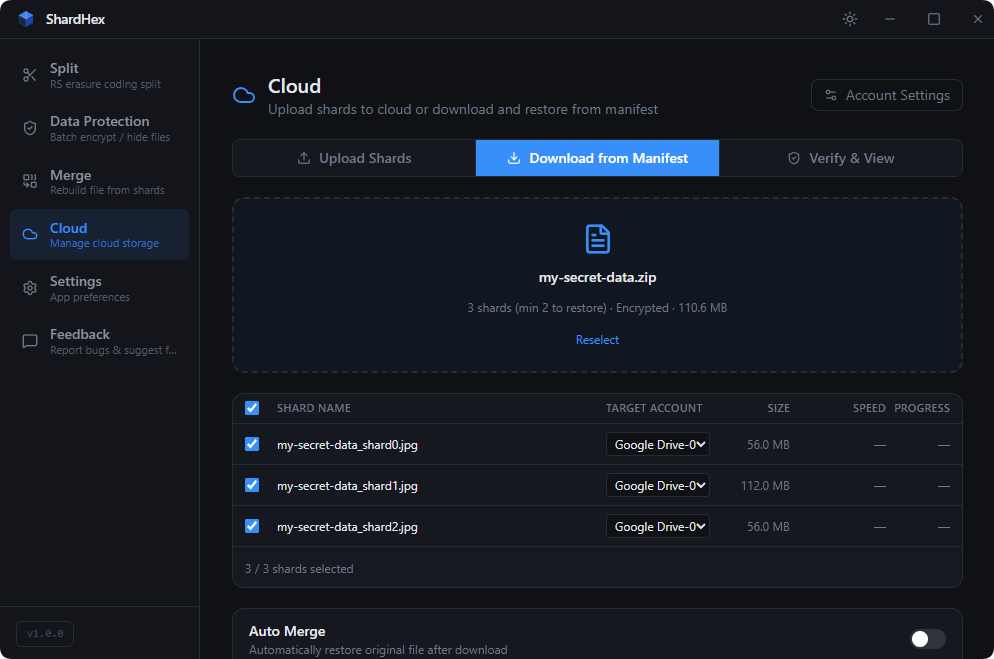
Fetch just K shards from your manifest and rebuild the original file — in any order, from any surviving subset
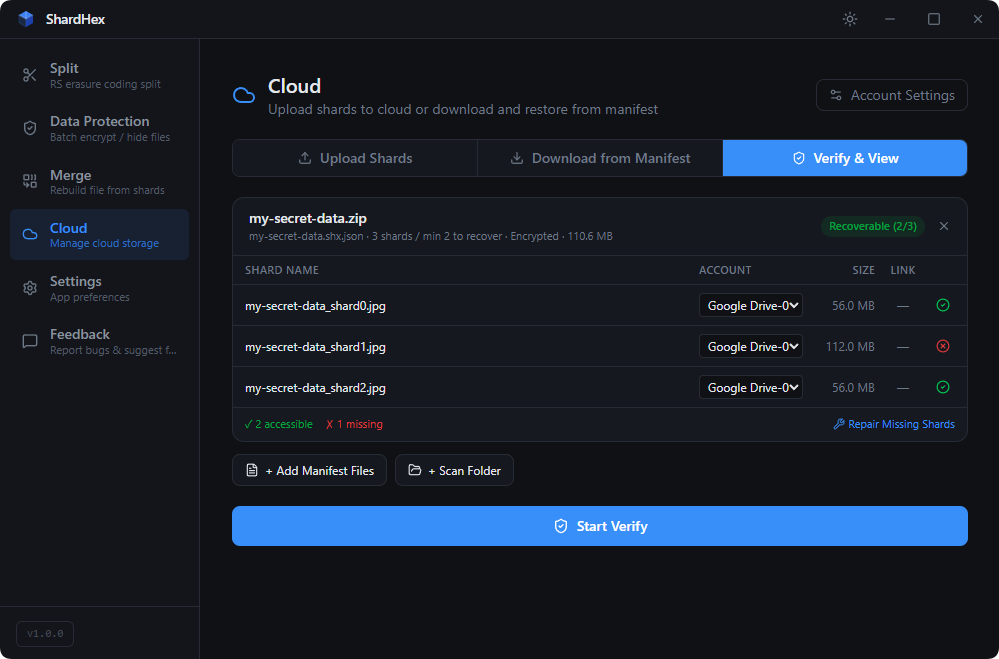
Check every shard across all connected clouds for integrity — detect corrupted or missing files before you need to restore
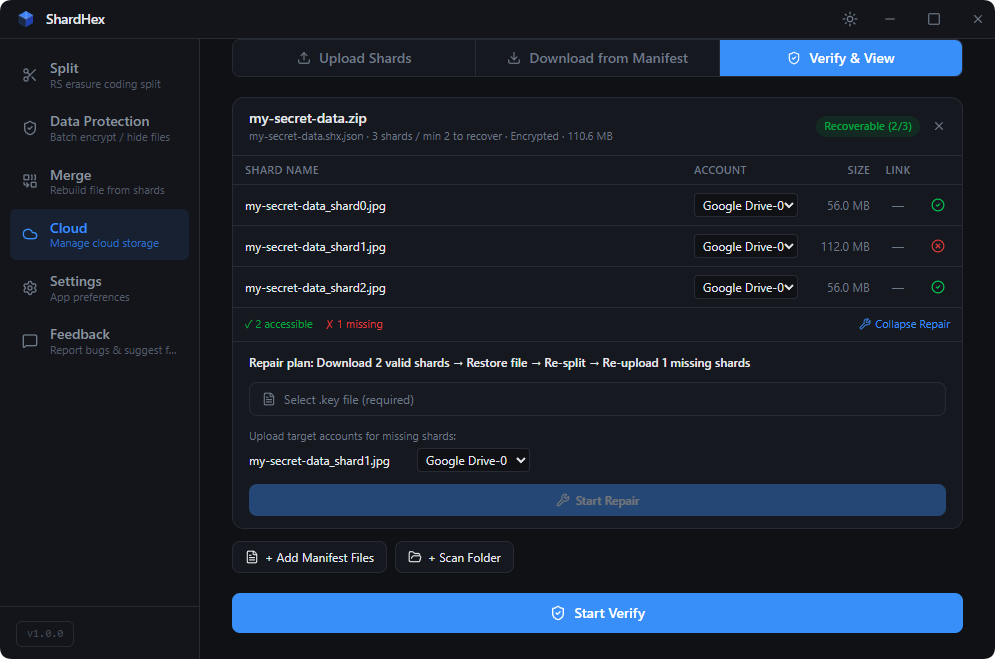
Reconstruct missing shards from the surviving ones and re-upload them — restores full N-of-K redundancy automatically
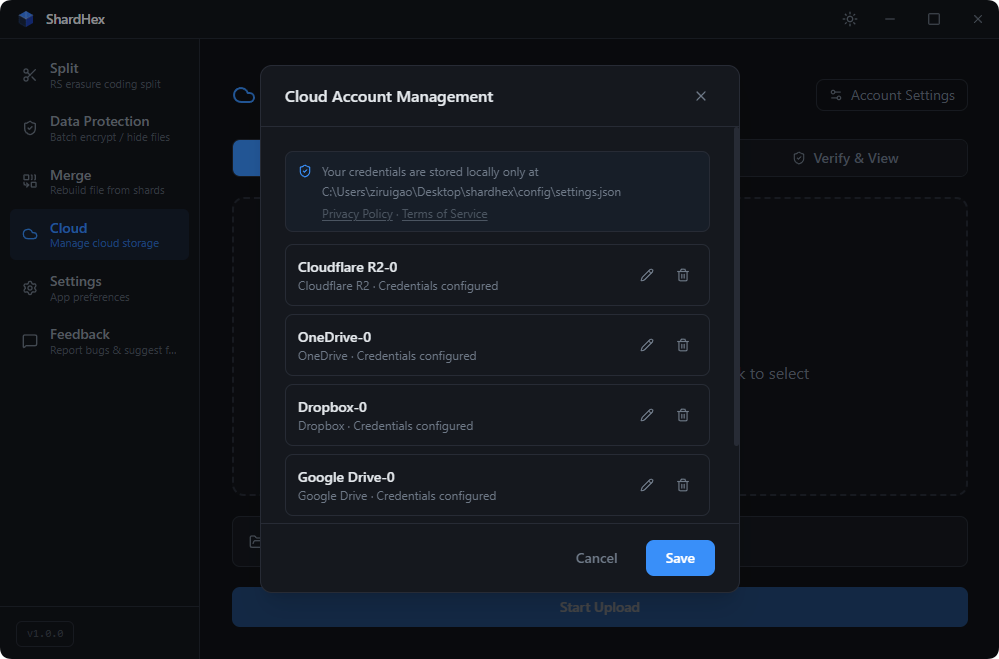
Manage credentials for 12 cloud providers — OAuth (Drive / OneDrive / Dropbox), API keys, or account login. Live connectivity status for each.
Protect or Split
Encrypt files directly, or split into erasure-coded shards
Scatter
Upload shards to different cloud providers
Verify
Check shard integrity across all clouds
Restore
Rebuild from any K shards or decrypt with your key
Pricing
Simple, honest pricing
Pay once, own forever. No subscriptions. No hidden fees.
Free
Local splitting, encryption and restoration — no limits.
- Reed-Solomon split & merge
- AES-256 encryption
- Steganography (hide in images / videos)
- Batch data protection (encrypt without splitting)
- SHA-256 integrity check
- Unlimited file size · configurable N/K
- Cloud upload & download
- Cloud integrity verification
- Multi-threaded & chunked cloud transfers
- Self-healing shard repair
Pro
Full cloud integration — buy once, own forever.
- Everything in Free
- Cloud upload & download
- Cloud integrity verification
- Parallel & HTTP-Range chunked transfers
- Self-healing shard repair
- 12 cloud providers (Drive, OneDrive, Dropbox, S3 / R2 / B2 / Wasabi / MinIO …)
- 3 device activations
- All future updates
- Priority support
Cloud Providers
Scatter across 12 cloud providers
Mainstream consumer drives, S3-compatible object storage, and free anonymous hosts. No single provider ever holds your complete file.
More providers being added regularly. Request a provider →
FAQ
Questions, answered
Everything potential users tend to ask before downloading.
What happens if a cloud provider deletes my account or my files?
Nothing critical — that's the entire point of ShardHex. Your file is split into N erasure-coded shards (typically 5) distributed across different providers. Any K of them (typically 3) mathematically reconstruct the original. If Google Drive bans your account or deletes your data, you still have OneDrive, Dropbox, S3, R2 — any 3 surviving shards bring the file back. There is no single point of failure to ban, attack, or accidentally delete.
Can ShardHex see, scan, or decrypt my files?
No. AES-256-CTR encryption happens entirely client-side, on your machine, before any byte leaves it. Each shard contains a slice of already-encrypted data plus Reed-Solomon parity bytes — there is no plaintext anywhere in transit or at rest in the cloud. Even if every cloud provider colluded, they could not read your data without your AES key, which never leaves your computer.
How many cloud providers do I actually need to restore my files?
Whatever K you chose at split time. The default is 5-of-3: split into 5 shards across 5 different providers, any 3 are enough to restore. You can configure other ratios — for example 7-of-4 for stronger redundancy, or 3-of-2 if you only have a few accounts. Higher N adds resilience at the cost of a bit more storage.
Does steganography really hide my data inside images?
Yes. ShardHex appends your encrypted shard after a JPG, PNG, or MP4 file's normal end-marker. The carrier file opens correctly in any photo viewer or video player — the extra bytes sit in a region image and video decoders silently ignore. This is useful when an obviously-encrypted blob would itself attract scrutiny; the stego file looks and behaves like an ordinary photo.
How is ShardHex different from Cryptomator, rclone, or Duplicati?
Cryptomator encrypts a folder before syncing it to one cloud — if that cloud bans your account or loses the data, your encrypted vault is gone with it. rclone moves files between clouds but does not split or shard them across providers. Duplicati does incremental encrypted backups to a single destination. ShardHex is the only tool that combines client-side AES-256 encryption with Reed-Solomon erasure coding across multiple cloud providers — losing one provider entirely is a non-event, your file remains fully recoverable.
What if I lose my license key or want to use it on a new computer?
Your license is tied to your purchase email and activates up to 3 devices via a hardware fingerprint. If you lose the key, contact support from the original email and we will re-issue it. If you switch to a new computer, you can deactivate the old device from inside the app to free up a slot — the new machine then activates normally. Tokens are signed offline, so the app keeps working without an internet connection between activations.
Still have a question? Email us → [email protected]